Cafe Casino Login Guide & How to Claim Your Daily Login Bonus

Get instant access to hundreds of games and big bonuses with a secure Cafe Casino login. Our commitment to a stress-free experience includes 24/7 support, robust security like 2FA, and lightning-fast cryptocurrency payouts. Sign in now to enjoy top-tier slots and table games tailored for your ultimate relaxation and entertainment.
Official Cafe Casino Login Page (Direct & Secure Link via CasinoMentor)
With so many fake sweepstakes websites attempting to steal your credentials, safety should always be your top priority. Phishing scams often create deceptive interfaces that mimic the official brand to steal account information and funds. To guarantee you are landing on the authentic platform, avoid clicking on random links from search engines.
Instead, simply navigate to the Cafe Casino review page right here on CasinoMentor.com (or scroll to the top of this article) and click the secure "Visit" button. Our verified system acts as a "security checkpoint," automatically redirecting you to the official Cafe Casino login portal without any risk of phishing or malware. This ensures your connection is direct and protected by Cafe Casino’s "Safety First" infrastructure, which includes reCaptcha and SMS Validation for your peace of mind.
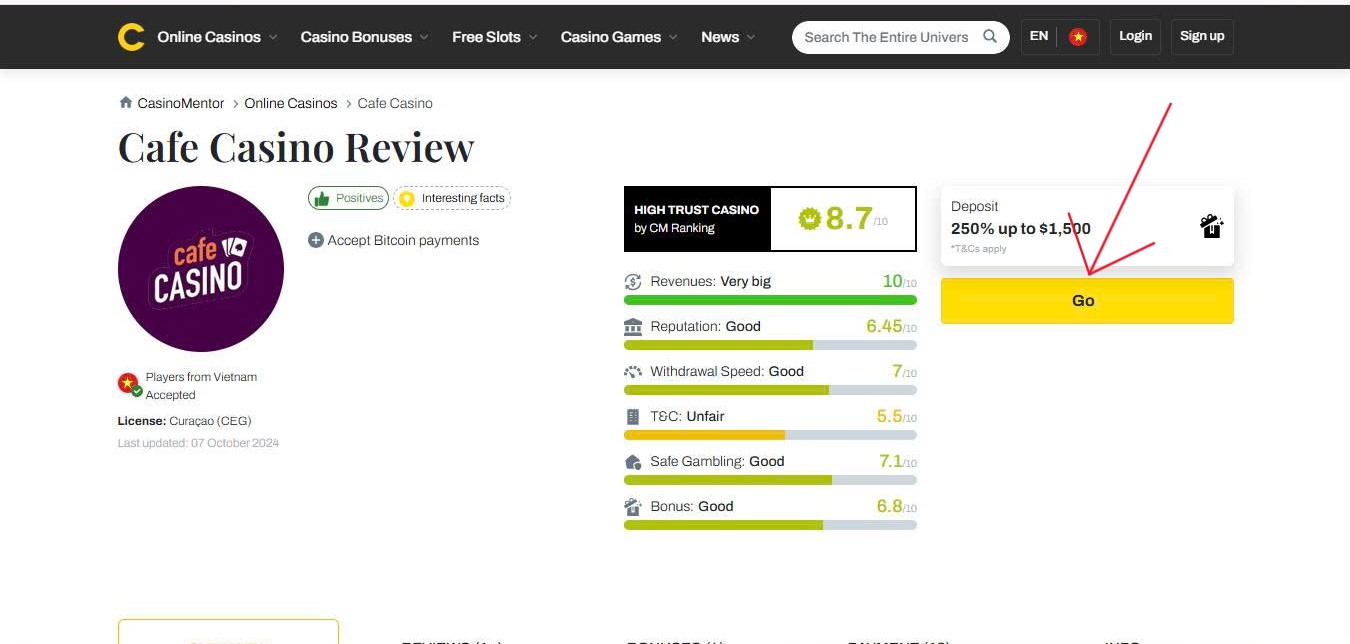
Step-by-Step Cafe Casino Login Process (Desktop & App)
Navigating the Cafe Casino login is designed to be a friction-free experience whether you are playing from home or on-the-go. Follow these simple steps to access your account securely:
- Step 1: Open Your Browser or App Launch your preferred web browser (such as Chrome or Safari) or open the Cafe Casino web app on your desktop or mobile device. The web app offers instant access to a huge menu of games directly from your home screen.
- Step 2: Locate the Login Button Once the homepage loads, find the "Login" or "Log In" button. This is typically positioned at the top right corner of the screen for easy visibility.
- Step 3: Enter Your Credentials In the "Welcome Back" window, enter your registered E-mail and Password.
- Note on Security: If you have enabled Two-Factor Authentication (2FA), you will be prompted to enter a 6-digit code generated by your authenticator app (such as Google Authenticator) to complete the login process.
- Troubleshooting Tip: If you encounter a red error message, it may be due to your browser's cache storing old information. Try clearing your cache or ensuring your Caps Lock is off, as accounts are blocked after 3 failed login attempts.
By following this verified process, you ensure that your Cafe Casino login is handled through the most secure channels, protecting your balance and personal data.
Explaining the Arbol Media B.V. Login Account Setup
Just as Chumba Casino utilizes a centralized VGW login, your Cafe Casino credentials function as a unique identification ID managed by Arbol Media B.V.. This unified account structure is designed to provide a seamless and secure gaming environment.
- Corporate Identity: Your login is the primary identifier within the operator's ecosystem, ensuring that your account is recognized across different service layers.
- System Synchronization: This setup helps synchronize your wallet balance, reward history (such as Cafe Casino Perks), and KYC (Know Your Customer) verification status. By maintaining a single, verified ID, the platform can efficiently track your progress and ensure that your identity remains protected across the entire network.
Login Troubleshooting: Password Recovery via Cafe Casino Help Center
Getting an "Invalid Username or Password" message can be frustrating. If standard access fails or your account is restricted, the Cafe Casino Help Center serves as your primary technical support portal.
- Forgot Password: If you cannot remember your credentials, click the "Forgot Password?" link on the login window. Enter your registered email address, and the system will send a Reset Link with further instructions. Note: Always check your spam folder if the email does not appear in your inbox immediately.
- Account Locked or Self-Excluded: To maintain high security, accounts are blocked after 3 failed login attempts. Additionally, login may be prevented if you have not completed required SMS Validation or if you have previously requested a Self-Exclusion.
- Technical Support Portal: For issues that standard recovery cannot solve—such as suspected hacking or account restrictions—you must navigate to the Help Center. From there, you can access the "Account and Security" section to find specific solutions or submit a support ticket.
- Direct Assistance: If you are unable to resolve the issue through the automated Help Center, you can use the following channels:
- Live Chat: Available 24 hours a day for immediate assistance.
- Email Support: Send a detailed inquiry to [email protected]; responses are typically provided within 48 hours.
- Community Forum: A 24/7 resource where you can seek advice from fellow players regarding common login glitches.
Pro-Tip: If you see a red error message when attempting to sign in, it is often due to your browser's cache storing outdated information. Try clearing your cache and refreshing the page before attempting to log in again.
Security Tips for a Safe Cafe Casino Login Experience
Ensuring your account remains secure is vital for protecting your bankroll and personal data. Follow these essential safety practices to maintain a secure Cafe Casino login:
- Enable Two-Factor Authentication (2FA): For the highest level of protection, activate 2FA in your Security Settings. This requires a 6-digit code from an authenticator app (like Google Authenticator) every time you sign in, withdraw funds, or update your profile.
- Complete SMS Validation: This extra layer of security verifies your registered phone number, ensuring that only you can access your account.
- Never Save Passwords on Public Devices: Avoid using the "Remember Me" feature on shared computers or public Wi-Fi networks to prevent unauthorized access.
- Verify the Official URL: Always ensure you are on the authentic site by checking for the SSL padlock icon and the https:// prefix in your browser’s address bar.
- Monitor for Security Alerts: Cafe Casino may send alerts if it detects unusual activity; always investigate these immediately through the official Help Center.
How to Claim the Cafe Casino Daily Login Bonus
The easiest way to build your bankroll without spending a dime is through the Cafe Casino daily login bonus and recurring promotions. By staying active, you can take advantage of the platform's generous reward system designed for loyal players.
- What You Receive: While specific rewards vary, players can often claim Cafe Casino Perks, free spins, or exclusive "no deposit" bonuses just for being a member.
- How to Claim: Log in to your account every 24 hours. Upon signing in, look for a "Claim Bonus" pop-up or check your "Promotions" dashboard. Simply click "Claim" to have the rewards instantly credited to your balance.
- Pro-Tip: Rewards often reset every 24 hours based on the system's clock. Set a daily reminder to log in consecutively, as daily streaks can often lead to bigger and better rewards through the Perks program.
FAQs
Why can't I log into my Cafe Casino account?
There are several common reasons for login issues. First, ensure your Caps Lock is off, as passwords are case-sensitive. Your account will be blocked after 3 failed attempts for security. Additionally, login may be restricted if you are using a VPN or residing in a restricted state such as New Jersey, New York, Maryland, Nevada, or Delaware. Lastly, try clearing your browser cache, as old data can often cause technical glitches.
How often can I collect the Cafe Casino login bonus?
You can typically collect daily rewards or check for new promotions once every 24 hours. Consistency is key—logging in daily ensures you don't miss out on time-sensitive "Hot Drop Jackpots" or updated Perk points.
Can I log in using multiple devices at the same time?
For your protection, the system is designed to maintain a single active session. If you log in on a new device, the system may automatically sign out the previous session to ensure that your account and balance remain secure.
What should I do if I see a red error message during login?
A red error message often indicates a system glitch or a credential error. Before contacting support, wait a minute, refresh the page, and ensure you see a "green check mark" next to your username and password fields before clicking login. If the problem persists, reach out to 24/7 Live Chat for immediate help.
RELATED ARTICLES

How to Play at Casiny Online Casino: Full Guide
Difference Between Penny Slots, Nickel Slots, and Quarter Slots
The Importance of Using Online Reviews and How They Can Help You Stay Safe Online

Why Is Gambling Illegal?
1Win Casino Login Guide & How to Claim Your Daily Login Bonus

Ocean Casino Login Guide & How to Claim Your Daily Login Bonus
Sportsbook Software Providers and Platform Strategy in 2026
Ivy Casino Login Guide & How to Claim Your Daily Login Bonus