Sportpesa Casino Login Guide & How to Claim Your Daily Login Bonus

Explore over 1,000 premium games, including slots and live dealer tables, with SportPesa. Designed for seamless play on mobile and desktop, your Sportpesa Casino login ensures secure access to top-tier entertainment and exclusive rewards. Join now to experience the ultimate in online gaming, backed by industry-leading security and responsible gambling standards.
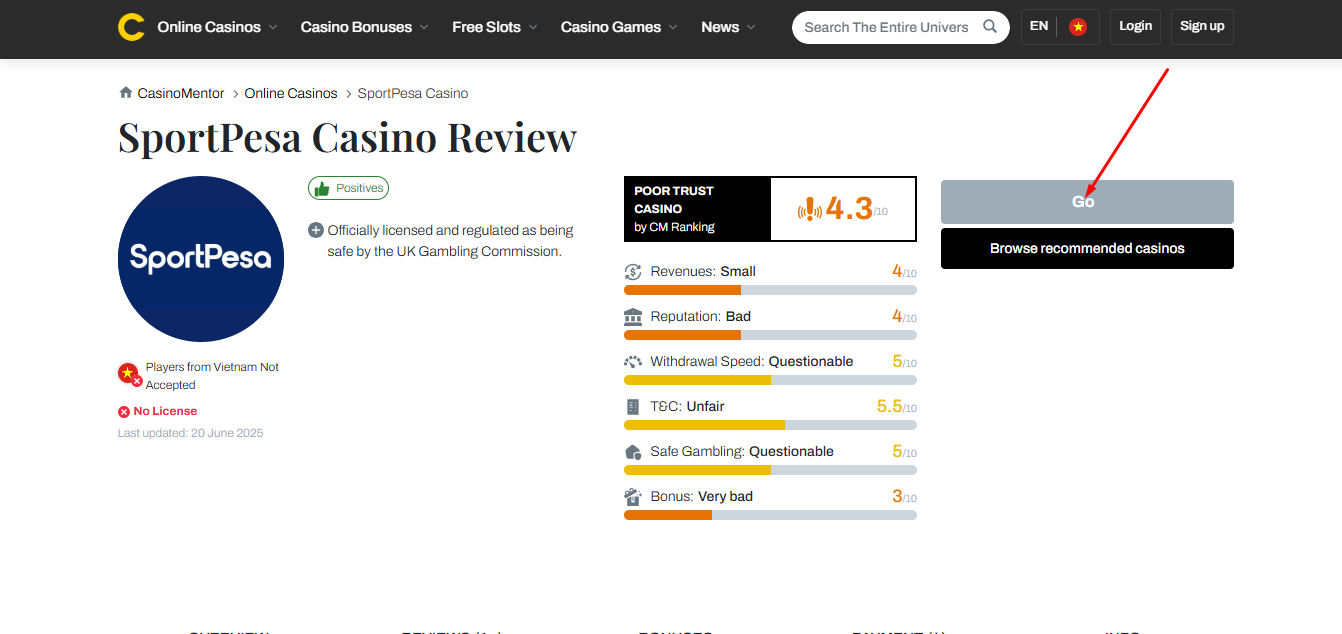
Official SportPesa Login Page (Direct & Secure Link via CasinoMentor)
With the rise of sophisticated phishing scams, safety must be your top priority when accessing your account. Fraudulent websites often mimic the official login page to steal your credentials and personal data. To eliminate this risk, CasinoMentor acts as a verified "security station" for players.
Instead of clicking on unverified links from search engines, we recommend the following secure process:
- Search and Verify: Navigate to the official SportPesa review on CasinoMentor.com or use the link provided at the top of this article.
- The "Visit" Mechanism: Once on the review page, click the secure "Visit" button.
- Secure Redirection: Our system uses a protected redirect path that sends you directly to the authentic Sportpesa Casino login portal. This ensures your connection is encrypted and prevents any exposure to malware or credential theft.
Step-by-Step SportPesa Login Process (Desktop & App)
Follow these steps to login in to your account safely, whether you are a new player or an experienced user.
Step 1: Access the Platform Open your preferred web browser on your desktop or mobile device. Alternatively, you can launch the SportPesa Casino App, which is optimized for Android 5 or higher and offers seamless play on the go.
Step 2: Locate the Login Button Look at the top right-hand corner of the screen or within the main navigation menu. Click on the "Log In" or "Login" button to open the secure portal.
Step 3: Enter Your Credentials Depending on your region (such as Kenya, Tanzania, or South Africa), you will need to provide your registered details:
- Phone Number: Enter the mobile number used during registration.
- Password: Input your secure password.
- For SMS/USSD Users: If you previously used SportPesa only via SMS or USSD, you can select the "Get a password to log in" option to access the web or app version.
- Forgot Password: If you cannot login a second time due to a lost password, use the "Forgot your password?" link to receive a reset code via SMS.
Important Security Note: Always ensure you are on the official domain—such as .co.ke, .co.tz, or .co.za—as the brand is operated by locally licensed companies in each specific market. Keeping your Account Access Information confidential is your primary responsibility to prevent unauthorized access.
Explaining the SportPesa Login Account Setup
To provide a seamless gaming experience, the SportPesa ecosystem operates under a unified account structure. In various markets, the brand is managed by licensed parent entities, such as Standard Global East Africa Limited. This setup mirrors corporate structures like VGW, where a single corporate identity allows for centralized management of player activities.
- Unified Corporate ID: Your Sportpesa Casino login serves as your unique identifier within the company’s network. Players are strictly required to maintain only one account per person.
- System Synchronization: This single ID centralizes your funds management, including deposits, wagers, and winnings. It also synchronizes your KYC (Know Your Customer) identity verification, as the company uses your provided personal information and documentation to verify your identity across its services. This ensures that your reward history and account status remain consistent across mobile and desktop platforms.
Login Troubleshooting: Password Recovery via Support System
When you encounter issues accessing your account—whether due to a forgotten password or a security lock—SportPesa provides a dedicated technical support framework to restore access.
- Password Recovery (Forgot Password):
- Navigate to the login portal and click on "Forgot your password?".
- Enter your registered username or phone number.
- Receive Reset Code: The system will send a verification code via SMS to your registered mobile device.
- Pro Tip: While the primary method is SMS, always check your linked email and spam folder for any related security notifications or account confirmations.
- Account Locked or Self-Excluded:
- Self-Exclusion: If you have previously opted for self-exclusion, your account will be blocked for the selected duration (ranging from 24 hours to permanent). Re-opening a self-excluded account is only possible after the period expires and involves a 24-hour cooling-off period.
- Security Lock/Dormancy: If your account is locked due to security concerns or has been categorized as dormant (no login for three months), you must contact the support team to initiate re-activation.
- Accessing the Support Ticketing Portal: For critical issues such as suspected hacking or account recovery, players should bypass general searches and use the official internal support channels. You can submit a support ticket or inquiry directly via the following links:
- General Support: supportpza.com.
- Kenya Support: [email protected].
- Finix Casino Support: [email protected].
By utilizing these verified support channels, you ensure your Account Access Information remains secure while receiving professional assistance to resolve login failures.
Security Tips for a Safe SportPesa Login Experience
Maintaining the integrity of your Account Access Information is your primary responsibility under the platform’s terms of service. To protect your funds and personal data, follow these essential security protocols:
- Enable Multi-Layer Security: Utilize SMS verification codes for sensitive actions such as registration or password resets to ensure that only the registered mobile owner can access the account.
- Never Save Passwords on Public Devices: Avoid using the "Remember Me" feature on shared computers or public Wi-Fi networks. You are fully responsible for any unauthorized disclosure or misuse of your login credentials.
- Verify the SSL Certificate: Before entering your Sportpesa Casino login details, always check for the SSL "padlock" icon in your browser's address bar. This confirms a secure https:// connection, protecting you from phishing and malware attacks.
- Monitor Account Activity: Regularly check your balance and transaction history. If you suspect your security has been compromised, you must notify SportPesa immediately to suspend the account and reset your credentials.
How to Claim the SportPesa Daily Login Bonus
The most consistent way to boost your bankroll is by taking advantage of the SportPesa daily login bonus. Whether you are playing the traditional casino or using the data-free USSD platform, staying active pays off.
- The Reward: While specific promotions vary by region, active players often receive free bets, casino credits, or entries into exclusive games like "Goal Rush," which offers weekly cash rewards.
- How to Claim: You don't necessarily need to place a wager to stay active. Simply perform your Sportpesa Casino login every 24 hours. A "Claim Bonus" pop-up will typically appear on your dashboard; click it to instantly credit the reward to your account.
- Expert Tip: Set a daily alarm to ensure you log in consecutively. Most bonuses reset every 24 hours based on local time (such as EAT for Kenya/Tanzania or SAST for South Africa). Maintaining a login streak can often lead to increased rewards or higher-tier promotional offers.
FAQs
Why can't I log into my SportPesa account?
Login failures are commonly caused by accessing the site from a Prohibited Jurisdiction (such as the USA or UK) or using a VPN that masks your IP address to a restricted region. Additionally, ensure your password is correct, as the system is case-sensitive and may lock the account after multiple failed attempts for security.
How often can I collect the SportPesa login bonus?
You can typically collect a daily reward exactly once every 24 hours. Regular participation is encouraged, as accounts that remain inactive (no login) for three months are categorized as dormant and may eventually be suspended.
Can I log in using multiple devices at the same time?
For your protection, SportPesa enforces a single-account-per-player policy. While you can access your account from different devices (mobile app or desktop), the system may automatically kick-out previous sessions to prevent unauthorized concurrent access and ensure your Account Access Information remains secure.



Ultimate Guide to the Latest Big Spin Casino Free Spin Codes and Promo Codes
1Win Casino Login Guide & How to Claim Your Daily Login Bonus

Ocean Casino Login Guide & How to Claim Your Daily Login Bonus

Sportsbook Software Providers and Platform Strategy in 2026