Funzcity Casino Login Guide & How to Claim Your Daily Login Bonus

Experience premium social gaming by using the Funzcity Casino login to access over 1,700 slots and massive jackpots. New members can jumpstart their journey with a 125,000 Fun Coins no-deposit bonus. Whether on desktop or mobile, enjoy a secure platform featuring 24/7 support and exciting daily rewards for the ultimate entertainment experience.
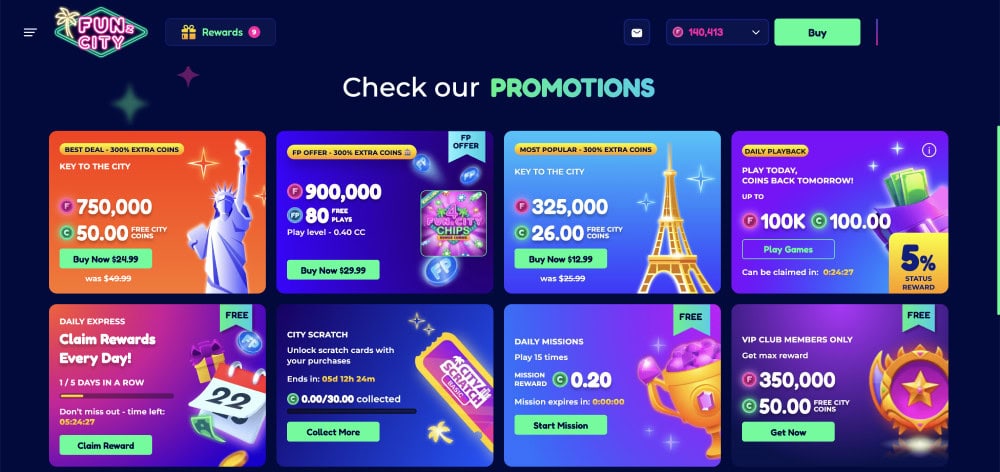
Official FunzCity Login Page (Direct & Secure Link via CasinoMentor)
With so many fake sweepstakes websites attempting to steal your credentials, safety should always be your top priority. Phishing scams are a real threat, where fraudulent sites mimic the official FunzCity interface to steal account details and funds. To guarantee you are landing on the authentic platform, avoid clicking on random links from search engines.
Instead, simply navigate to the FunzCity review page right here on CasinoMentor.com (or scroll to the top of this article) and click the secure "Visit" button. Our verified system acts as a secure "clearinghouse," instantly redirecting you to the official FunzCity login portal. This ensures your information remains encrypted and protected from malware or unauthorized interception during the transition.
Step-by-Step FunzCity Login Process (Desktop & App)
Regaining access to your account is designed to be quick and easy. Follow these steps to log in securely:
- Step 1: Open your Browser or App Launch your preferred web browser on your desktop or mobile device. For the best experience on PC, Google Chrome is recommended. If you are using a mobile device, FunzCity is fully optimized for all mobile browsers, and an Android APK is also available for a dedicated experience.
- Step 2: Locate the Login Button Once the homepage loads, navigate to the top right corner of the screen and click the "Log In" button.
- Step 3: Choose Your Login Method You can access your account through several secure methods depending on how you registered:
- Email and Password: Enter your registered email address and your password. You can click the "shut-eye" icon to reveal your password while typing to ensure accuracy.
- Social Media Login: If you linked your account during registration, simply click the Google or Facebook icons to log in instantly.
- Apple ID: Users who registered via their Apple account can also use this method for a fast and secure entry.
Pro Tip: If you encounter any issues, such as a forgotten password, click the "Forgot password?" link on the login page to receive a reset link via your registered email. For further security, you can set up Two-Factor Authentication (2FA) through your account settings once logged in.
Explaining the FunzCity Login Account Setup
Much like how the VGW group (Virtual Gaming Worlds) manages a network of major platforms like Chumba Casino, Global Poker, and Luckyland Slots, FunzCity is operated by A1 Development LLC. When you complete the Funcity Casino login process, you are essentially accessing a unified corporate identity.
This setup is crucial because your login acts as a single, unique identifier within the operator's ecosystem. This synchronization provides several benefits:
- Wallet Integration: Your Fun Coins (FC) and City Coins (CC) balances are managed through this central ID, ensuring accurate tracking of your rewards.
- Unified KYC (Know Your Customer): Once you complete the identity verification process—which may include providing a photo ID or performing a "quick verify" after a purchase—your verified status is tied to this unique account, making future redemptions smoother.
- Consistent History: Your entire gameplay history and prize redemption records are stored under this single ID, allowing for better security and account management.
Login Troubleshooting: Password Recovery via Support System
Losing access to your account can be a frustrating experience, but the platform provides a structured technical support system to help you recover it.
Forgot Password (Standard Recovery)
If you cannot remember your credentials, follow these steps to reset them:
- Navigate to the official login page and click the "Forgot Password?" link.
- Enter your registered email address.
- Check your inbox for a reset link. (Note: Always check your Spam or Junk folder if the email does not appear within a few minutes).
- Follow the instructions in the email to create a new, secure password.
Account Locked or Self-Excluded
Your account may be blocked due to a security protocol triggered by three consecutive incorrect login attempts, detected use of a VPN from restricted states, or "bonus abuse". In more serious cases, accounts are locked to prevent fraudulent activity or to honor Self-Exclusion requests made through the "Responsible Play" settings.
Support Ticketing and Zendesk Integration
For complex issues like a locked account or suspected hacking, you must reach out to the technical team. The platform utilizes advanced support tools, including Zendesk, to manage customer interactions and optimize the chat-box functions.
- Live Chat Bot: Available 24/7 for immediate automated assistance with basic queries.
- Email Support: For high-level technical help, users should email [email protected]. A support representative typically responds within three to four hours to resolve your ticket.
- Direct Support Ticketing: If the automated bot cannot resolve your issue, you can request a transfer to a live human agent or file a formal complaint through the chat icon located at the bottom right of every page.
Security Tips for a Safe FunzCity Login Experience
To protect your virtual assets and personal data, follow these essential security protocols:
- Enable Two-Factor Authentication (2FA): Once logged in, navigate to your account settings to set up 2FA via Google or Facebook. This adds a vital secondary layer of security that prevents unauthorized access even if your password is compromised.
- Avoid Saving Passwords on Shared Devices: Never use the "Stay Logged In" feature on public computers or unsecure Wi-Fi networks. Always manually log out of your browser or mobile application when you are finished playing to clear your session.
- Verify the Official SSL Certificate: Before entering any credentials, ensure the URL begins with "https://" and displays the padlock icon in the address bar. This confirms your connection is encrypted and protects you from phishing sites designed to steal login data.
How to Claim the FunzCity Daily Login Bonus
The easiest way to build your bankroll without spending a dime is through the FunzCity daily rewards system, specifically the Daily Express bonus.
- Rewards Offered: By signing in every 24 hours, you can receive up to 5 Fun Points or 0.20 City Coins (CC).
- How to Claim: You do not need to make a purchase to receive these coins. Simply log in to your account, and a "Daily Missions" or mystery box pop-up will appear. Click the "Claim" or complete the assigned task to have the coins added to your balance immediately.
- Tip: Consistency pays off. If you log in and complete missions for five consecutive days, your rewards increase. Completing a full seven-day streak awards you 15 Fun Points and 0.40 CC. Since the bonus resets every 24 hours, set a daily reminder to maximize your progress through the 10-tier VIP Club Prize Wheel spins.
FAQs
Why can't I log into my FunzCity account?
Common reasons include entering incorrect credentials (email or password), attempting to log in via a VPN from a restricted state (such as NV, WA, or MI), or having your account blocked due to three consecutive failed login attempts.
How often can I collect the FunzCity login bonus?
You are eligible to collect the Daily Express or daily mission rewards exactly once every 24 hours.
Can I log in using multiple devices at the same time?
While FunzCity is compatible with both desktop and mobile, it is highly recommended to run only one window or application at a time. Running multiple sessions simultaneously can trigger security protocols, lead to performance lagging, or cause the system to automatically log you out to protect your account integrity.
RELATED ARTICLES
This Is Vegas Casino Login: Secure Account Access Guide
FatFruit Casino No Deposit Bonus 2026: 20 Free Spins — Full Guide & Honest Review

Pai Gow Poker: A Beginner's Guide
Villento Casino Login Guide & How to Claim Your Daily Login Bonus
Comprehensive Guide to A Big Candy Casino Free Spins Promo Codes & Safety Warnings

Ultimate Guide to the Latest Big Spin Casino Free Spin Codes and Promo Codes
1Win Casino Login Guide & How to Claim Your Daily Login Bonus
Ocean Casino Login Guide & How to Claim Your Daily Login Bonus